How HTTP routing really works
We have all handled routes in our web applications — the familiar /users, /blog,
and similar endpoints. Most of us learned routing through frameworks like
Express:
const express = require("express");
const app = express();
const port = 3000;

app.get("/", (req, res) => {
  res.send("Hello World!");
});

app.listen(port, () => {
  console.log(`Example app listening on port ${port}`);
});
This snippet starts an HTTP server on port 3000 and registers a handler for the / route. It is popular for a reason: it is simple, expressive, and hides a large amount of complexity behind a clean API.
But underneath this simplicity, a web server is still just a program that reads and writes bytes over a network socket. Express is not “magic” — it is a carefully engineered system that sits on top of TCP and implements the HTTP protocol, routing, middleware, parsing, and response handling for you.
In this article, we will peel away those abstractions and build a very small HTTP router directly on top of a raw TCP stream.
To be precise: we are not “routing TCP.” Routing is an HTTP-level concept. TCP only provides a stream of bytes. Our job will be to interpret those bytes as an HTTP request and then choose a handler based on the request’s method and path.
What Really Happens Inside a Web Server?
At a high level, every HTTP server follows this pipeline:
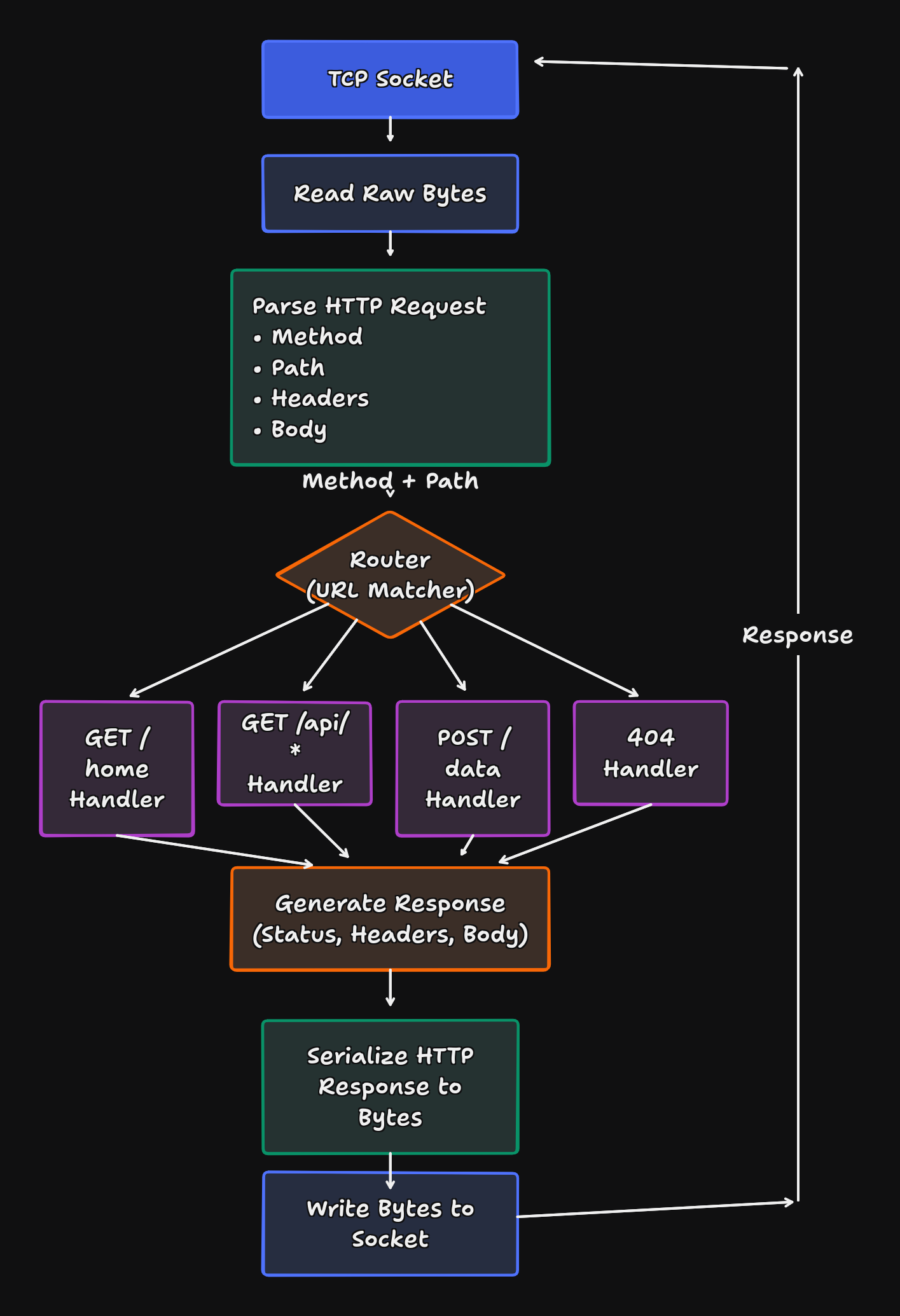
Frameworks like Express implement this entire pipeline for you. We will implement a minimal version of the same idea ourselves.
The goal is not to replace Express — it is to understand what it is actually doing under the hood.
A Minimal TCP-Based HTTP Router in Rust
A TCP connection gives us nothing more than a stream of bytes. If we want routing, we must:
Step 1 Read bytes from the socket
Step 2 Interpret them as an HTTP request
Step 3 Inspect the method and path
Step 4 Dispatch to the appropriate handler
Here is a minimal teaching implementation:
fn handle_client(mut stream: TcpStream) { let mut buffer = [0; 1024];

    match stream.read(&mut buffer) {
        Ok(size) => {
            let request = String::from_utf8_lossy(&buffer[..size]);

            let (status_line, content) = match &*request {
                r if r.starts_with("POST /users") => handle_post_request(r),
                r if r.starts_with("GET /users/") => handle_get_request(r),
                r if r.starts_with("GET /users") => handle_get_all_request(r),
                r if r.starts_with("DELETE /users/") => handle_delete_request(r),
                _ => (NOT_FOUND.to_string(), "Not Found".to_string()),
            };

            let response = format!("{}{}", status_line, content);

            if let Err(e) = stream.write_all(response.as_bytes()) {
                eprintln!("Failed to send response: {}", e);
            }
        }
        Err(e) => eprintln!("Error reading from stream: {}", e),
    }

}
Let’s break down exactly what is happening in this code.
1. Reading from the Socket
let mut buffer = [0; 1024];
match stream.read(&mut buffer) { ... }
We create a fixed-size buffer of 1024 bytes and try to read data from the TcpStream. This is where we get the raw bytes sent by the client (your browser).
2. Converting Bytes to String
let request = String::from_utf8_lossy(&buffer[..size]);The browser sends bytes, but we need text to make routing decisions. String::from_utf8_lossy converts the raw bytes into a Rust String. If there are invalid UTF-8 sequences, it replaces them with instead of crashing.
3. The Routing Logic (Pattern Matching)
let (status_line, content) = match &*request {
    r if r.starts_with("POST /users") => handle_post_request(r),
    r if r.starts_with("GET /users/") => handle_get_request(r),
    r if r.starts_with("GET /users") => handle_get_all_request(r),
    r if r.starts_with("DELETE /users/") => handle_delete_request(r),
    _ => (NOT_FOUND.to_string(), "Not Found".to_string()),
};
This match block is the core Router. It inspects the request string to see if it starts with a specific method and path combo (like "GET /users").
- If it matches, it delegates to a specific handler function (e.g.,
handle_get_request). - If no patterns match, it defaults to the
_case, returning a 404 Not Found.
4. Sending the Response
let response = format!("{}{}", status_line, content);
stream.write_all(response.as_bytes())
Finally, we take the result from the handler (the status line and the content), combine them into a single HTTP response string, and write the bytes back to the socket.
[!NOTE] This Is a Teaching Implementation
This code is intentionally naive:
- HTTP requests can be larger than 1024 bytes.
read()is not guaranteed to return the full request in one go.- Real servers must handle partial reads, buffering, persistent connections, and full HTTP parsing.
- A real router parses the request line and headers properly instead of using simple string prefix matching.
Despite these limitations, this implementation exposes the core idea: routing is just structured decision-making over bytes read from a TCP socket.